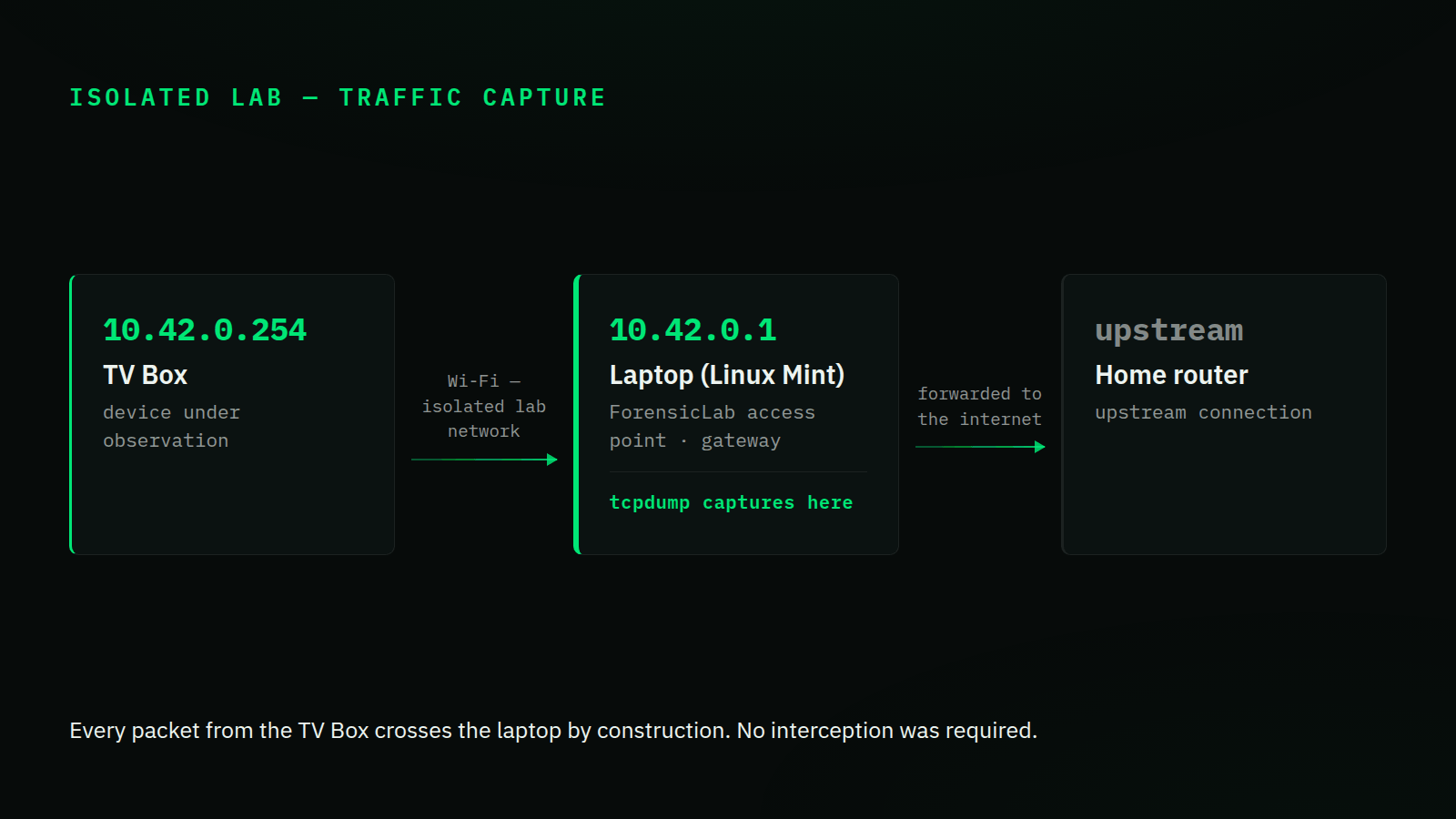
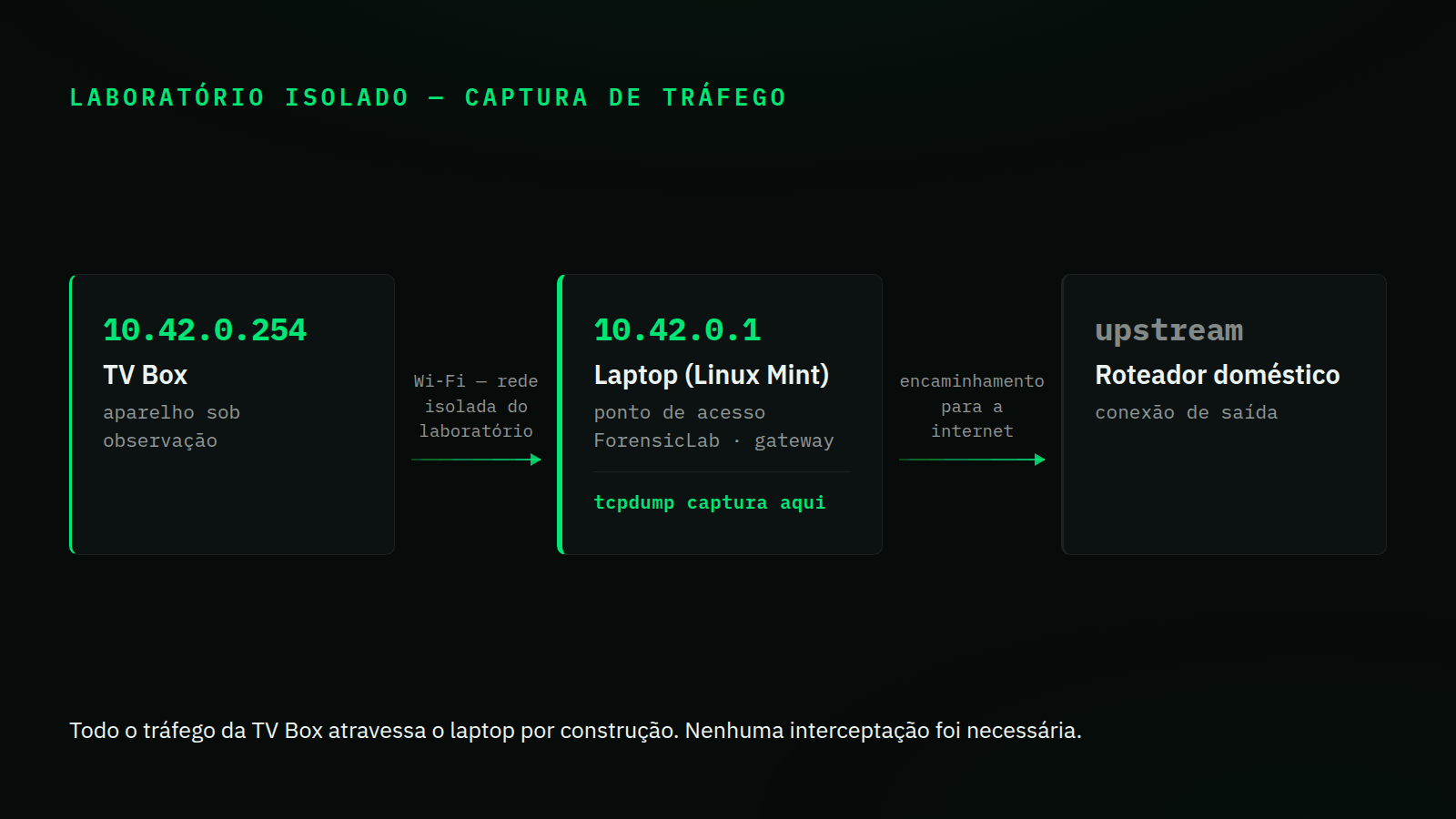
Correção — 2 de setembro de 2026. Na versão publicada em 29 de janeiro, este artigo descrevia a captura como um ataque man-in-the-middle por ARP spoofing. Não foi: a TV Box estava ligada a um ponto de acesso hospedado no laptop, de modo que o tráfego dela atravessava a máquina de captura por construção, e nenhuma das capturas contém ARP forjado. A seção de metodologia e o diagrama agora descrevem o que foi feito. Os achados não mudaram — a telemetria, os domínios e as portas continuam verificáveis nas mesmas capturas, e o payload decodificado no arquivo retirado do aparelho.
Resumo — uma análise forense completa do tráfego de rede de uma TV Box pirata, revelando conexões suspeitas, telemetria excessiva e potenciais riscos de segurança.
O Início da Suspeita
Como muitos brasileiros, fiquei curioso sobre o funcionamento interno das famosas "TV Boxes" que prometem canais ilimitados. A promessa é tentadora — "filmes e séries de graça". Mas, como engenheiro de software com foco em segurança, sei que se você não paga pelo produto, você é o produto.
Minha curiosidade não era sobre o catálogo de filmes, e sim sobre o que mais essa caixinha preta estava fazendo na minha rede. Será que ela apenas baixa vídeos? Ou será que ela está enviando meus dados para algum lugar? Ela está minerando criptomoedas? Fazendo parte de uma botnet?
Decidi investigar. Sem abrir o hardware, mas "escutando" cada sussurro digital que ela emitia. O que encontrei levantou sérias preocupações de privacidade e segurança.
Metodologia — Captura em Laboratório Isolado
Para realizar essa investigação, montei um laboratório isolado usando Linux Mint e
ferramentas open source. Em vez de mexer na rede de casa, levantei um ponto de acesso Wi-Fi no
próprio laptop — ForensicLab, em modo de conexão compartilhada — e conectei a TV Box
nele. O aparelho recebeu 10.42.0.254 por DHCP e o laptop passou a ser o gateway em
10.42.0.1, de modo que todo o tráfego já atravessava a minha máquina por
construção. Nenhuma interceptação foi necessária.
⚠️ Nota legal e ética — toda a investigação foi conduzida em equipamento próprio, na minha própria rede e em laboratório isolado, com finalidade exclusivamente educacional e defensiva. Nenhuma rede foi atacada: o aparelho é meu e foi ligado a uma rede que eu mesmo criei para observá-lo. Interceptar tráfego em redes de terceiros sem autorização é ilegal na maioria das jurisdições e pode constituir crime.
Minha caixa de ferramentas
- nmap — para encontrar a TV Box na rede e descobrir suas portas abertas.
- NetworkManager — para levantar o ponto de acesso
ForensicLabem modo compartilhado, colocando a TV Box numa rede isolada cujo gateway é o laptop. - tcpdump — para capturar todos os pacotes de dados e analisá-los depois.
- Wireshark/Tshark — para dissecar o tráfego capturado.
O Ponto de Acesso de Laboratório
Numa rede doméstica comum a TV Box fala direto com o roteador e o tráfego nunca passa pelo meu computador. Ligando-a a um ponto de acesso hospedado no laptop, a topologia resolve isso sozinha: o laptop é o gateway, encaminha o tráfego para a internet e enxerga tudo que passa. É mais simples que um ataque, e mantém o aparelho fora da rede de casa enquanto está sob observação.
$ nmcli connection up ForensicLab

$ tshark -r iptv_clean.pcap -Y arp | head -2
2 1.494708 IntelCor_xx:xx:xx → ChinaDra_xx:xx:xx ARP 42 Who has 10.42.0.254? Tell 10.42.0.1
3 1.639257 ChinaDra_xx:xx:xx → IntelCor_xx:xx:xx ARP 42 10.42.0.254 is at 24:b7:2a:xx:xx:xx

$ tshark -r iptv_clean.pcap -Y arp -T fields -e arp.src.proto_ipv4 -e arp.src.hw_mac | sort -u
10.42.0.1    7c:b0:c2:xx:xx:xx
10.42.0.254  24:b7:2a:xx:xx:xx
Resolução ARP normal dentro do laboratório: o laptop (10.42.0.1) pergunta pelo cliente e a TV Box (10.42.0.254) responde. É o gateway falando com o próprio cliente. O segundo comando é o que fecha a questão: cada endereço aparece com um único MAC nas duas capturas. Envenenamento de ARP produz o oposto — um mesmo IP anunciado por dois MACs, com rajada de respostas não solicitadas. Não há ARP forjado aqui porque não foi preciso. Os endereços MAC aparecem mascarados comoxx:xx:xxnos três últimos octetos em todo o artigo; ao rodar os comandos você verá os valores completos.
Evidências Coletadas
A captura durou 3 min 54 s e rendeu 56 mil pacotes, 72 MB
(capinfos iptv_clean.pcap) — não os “alguns gigabytes” que este
parágrafo afirmava antes desta correção. O silêncio da sala contrastava com o barulho digital
que a TV Box fazia.
$ tshark -r iptv_clean.pcap -c 5
    1   0.000000 10.42.0.254 → 10.42.0.1    DNS 75 Standard query 0x1234 A tigtvliveslb.yh32df8f.click
    2   0.054321 10.42.0.1 → 10.42.0.254    DNS 91 Standard query response 0x1234 A 45.134.142.x
    3   0.102341 10.42.0.254 → 45.134.142.x TCP 74 49234 → 9999 [SYN] Seq=0 Win=29200 Len=0 MSS=1460
    4   0.124512 10.42.0.254 → 208.115.219.x TCP 74 49235 → 53419 [SYN] Seq=0 Win=29200 Len=0
    5   0.154123 10.42.0.254 → 203.119.217.x HTTP 214 GET /api/v1/telemetry HTTP/1.1
Log reconstruído dos pacotes — note as conexões para domínios estranhos e portas não padrão.
1. O "Phone Home" Constante
Mesmo quando a TV parecia desligada (standby), ela mantinha uma comunicação frenética com servidores externos. Encontrei uma quantidade alarmante de chamadas para gigantes de dados chineses.
amdcopen.m.taobao.com       <-- Alibaba Mobile Data
umengjmacs.m.taobao.com     <-- Umeng Analytics
ulogs.umeng.com             <-- Logs de usuário
2. Domínios Suspeitos (DGA?)
Mais preocupantes que a telemetria corporativa foram as requisições para domínios com nomes que parecem gerados aleatoriamente. Esse padrão é compatível com DGA, técnica por vezes usada em infraestrutura de C2 (comando e controle), mas os nomes isoladamente não comprovam essa finalidade.
tigtvliveslb.yh32df8f.clickffsqqm.m45504d3.xyz(.xyz é um TLD barato e descartável, frequentemente abusado por infraestrutura maliciosa)pu9z3cca.trumpary.com(subdomínio aleatório em domínio sem sentido — estrutura compatível com DGA)
3. Payload Decodificado
O arquivo hosts capturado não era texto comum, mas um payload ofuscado em
Base64 (codificação, não criptografia). Depois de decodificado, não era um arquivo hosts de forma alguma: um
hosts mapeia nomes para endereços, e este trazia cerca de 400 endereços IPv4 crus,
sem nada a que mapeá-los. O que o aparelho faz com uma lista desse tamanho não aparece na
captura — uma lista de peers, um pool de rotação de C2 e um conjunto-alvo de injeção de DNS
teriam todos essa mesma aparência em disco. A contagem é o achado; a finalidade, não.
Análise Técnica — Principais Destinos de Rede
| Posição | IP de Destino | Porta | Análise |
|---|---|---|---|
| #2 | 52.85.78.52 | 80 | AWS CloudFront (streaming de vídeo) |
| #3 | 208.115.219.x | 53419 | Porta efêmera alta — destino em porta dinâmica (49152+), um sinal que exige correlação com o protocolo e o payload. |
| #4 | 154.47.25.x | — | IP desconhecido — tráfego sem porta identificada. |
| #5 | 45.134.142.x | 9999 | Porta não padrão — a porta 9999 pode atender serviços legítimos ou ferramentas de acesso remoto; o destino externo exige análise adicional do payload. |
| #6 | 192.168.0.1 | 1900 | UPnP/SSDP — protocolo que pode ser explorado para abrir portas no roteador. |
A posição #1 por volume era a própria TV Box, em
10.42.0.254 na rede do laboratório — ela aparece no topo porque é o
aparelho sob observação, e não um destino externo. Fica fora desta tabela por isso.
As posições preservam a ordem original por volume. Os destinos não identificados
aparecem com o último octeto mascarado como .x; o endereço da CloudFront
fica inteiro por ser infraestrutura pública de CDN, compartilhada por incontáveis
sites e atribuível a ninguém.
Veredito
Minha conclusão operacional — não considero este dispositivo seguro para uso na rede principal.
A captura mostra telemetria persistente e comunicação com destinos não identificados, inclusive por portas incomuns. Esses padrões justificam isolamento e investigação adicional, mas nada disso — nem o tráfego capturado, nem o arquivo decodificado — comprova infecção por malware ou participação em botnet.
Recomendações de Segurança
- Isole o Dispositivo — use uma VLAN de convidados.
- Bloqueie via DNS — use Pi-hole para bloquear
taobao.comeumeng.com. - Segregação Total — jamais acesse serviços bancários na mesma rede que este dispositivo.
🔗 Conexão com TerraVault
Esta investigação prática exemplifica a mesma mentalidade de detecção de anomalias que apliquei no TerraVault, meu projeto de conclusão de curso. Assim como padrões incomuns no tráfego de rede orientam uma investigação, o TerraVault combina regras determinísticas com um Isolation Forest para priorizar configurações estruturalmente atípicas. Ele automatiza a triagem, mas não substitui a análise humana nem trata anomalia como veredito de risco.
Fique seguro,
@oguarni